How to file your tourist tax on taxedesejour.ofeaweb.fr, step by step
The illustrated guide to the Métropole Nice Côte d'Azur tourist-tax portal (taxe de séjour) for Airbnb and Booking hosts: every screen, every field, and the mistakes that throw a return off. The portal is in French only, so we keep its exact labels in « » with a translation.
1Log in to your host account
Go to taxedesejour.ofeaweb.fr/ts/metropole-nca and enter your username and password in the box « J'accède à mon espace hébergeur » (Access my host account), then click « Connexion » (Log in).
No account yet? Click « Créer mon espace hébergeur » (Create my host account). Lost password? « Mot de passe oublié ? » (Forgot password?). For Nice and Villefranche-sur-Mer, the home page also reminds you of the change-of-use rules (changement d'usage).
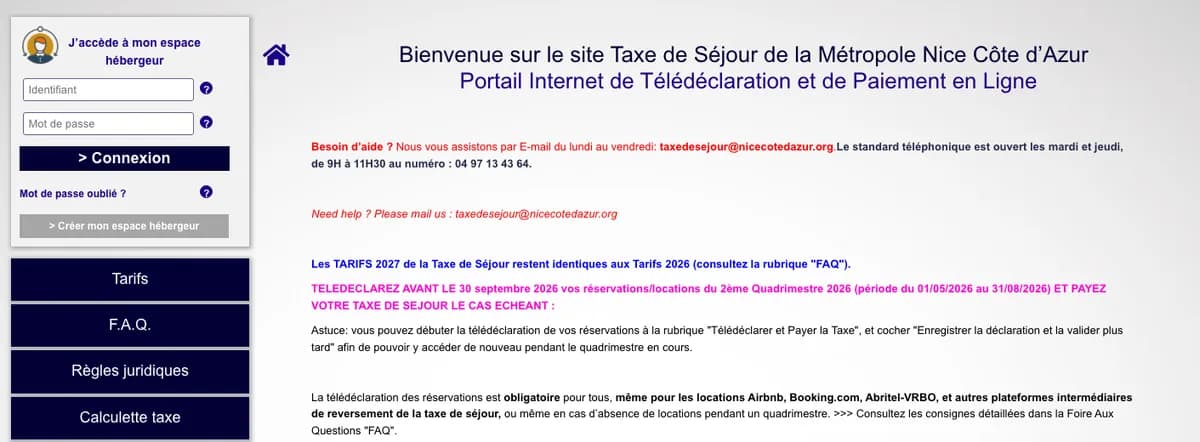
Home page of the Métropole Nice Côte d'Azur tourist-tax portal, with the login box · portal screenshot, personal data hidden 2Open « Télédéclarer et Payer la Taxe »
In the left menu, click « Télédéclarer et Payer la Taxe » (File and pay the tax), then « Ajouter une déclaration » (Add a return). Further down, the table « Vos déclarations à 0 € » (Your €0 returns, click to expand) lists what you have already filed: check the period is not there yet.
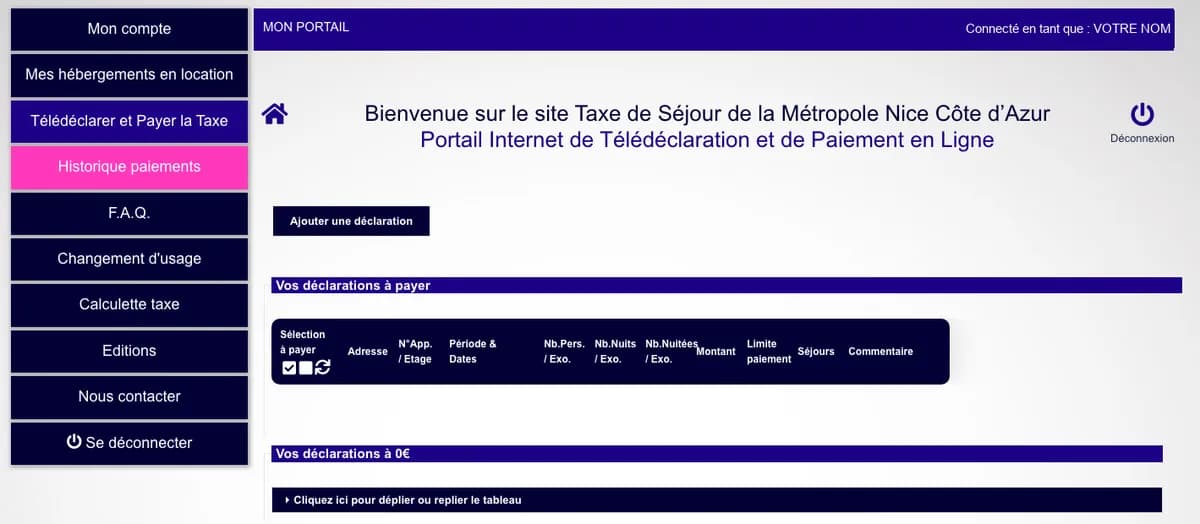
Portal menu once logged in, with the « Ajouter une déclaration » button · portal screenshot, personal data hidden 3Choose the period and the property
« Période de perception » (collection period): the four-month period (quadrimestre) you are declaring, January–April, May–August or September–December. The portal often preselects the current one: double-check it, it is the most common mistake.
« Hébergement » (property): your rental, shown with its registration number and address. The « Catégorie » (category, e.g. unclassified furnished tourist rental) appears automatically and sets the rate. Then click « Déclarer des séjours » (Declare stays). With no rentals at all in the period, use « Pas de séjour à déclarer sur cette période » (No stays to declare): the return is still mandatory.
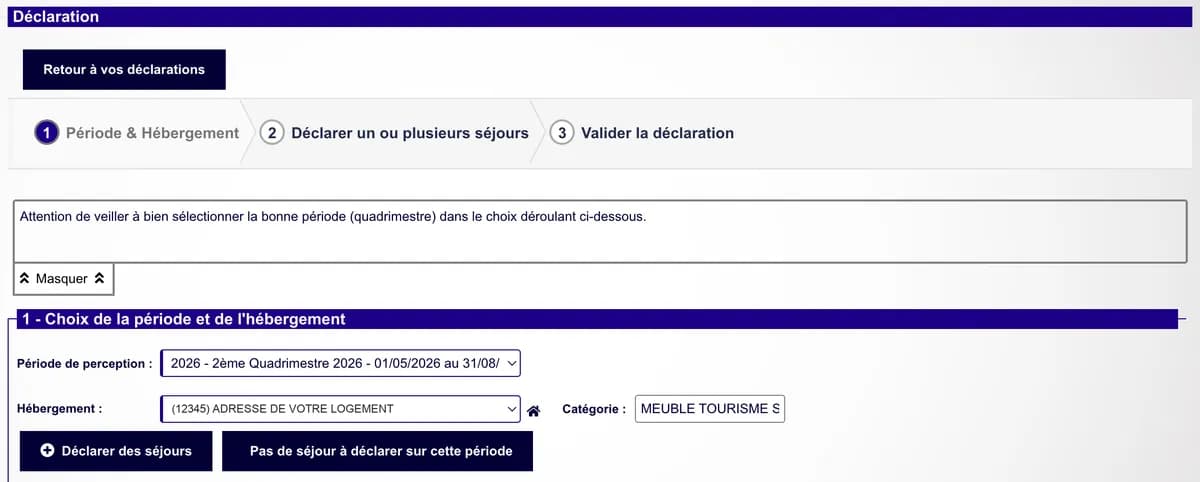
Step 1 of the form: choosing the collection period and the property · portal screenshot, personal data hidden 4Enter each Airbnb or Booking stay
For each booking, tick « Déclarer les nuitées des plateformes de location » (Declare nights booked through rental platforms), not « Déclarer un séjour standard » (standard stay), which is for direct bookings. Then fill in:
« Nom de la plateforme » (platform name): AIRBNB, BOOKING, etc.
« Date de début de séjour » and « Date de fin de séjour » (arrival and departure dates), in DD/MM/YYYY format. The number of nights is computed for you; if it looks wrong, day and month were swapped.
« Nbre total personnes » (total guests) and « Dont exonérées » (of whom exempt): all guests, then the number of minors. When you enter exempt guests, tick the reason (minors) in the list that appears.
« Coût TTC du séjour » (stay cost incl. tax): according to the Métropole's guidance for platforms, the total amount you received for the stay, after deducting service fees and cleaning fees. It is not the price the guest paid.
The portal then computes the tax and shows « Taxe de séjour à reverser par l'hébergeur » (tax the host must pay): €0.00 when the platform has already collected it.
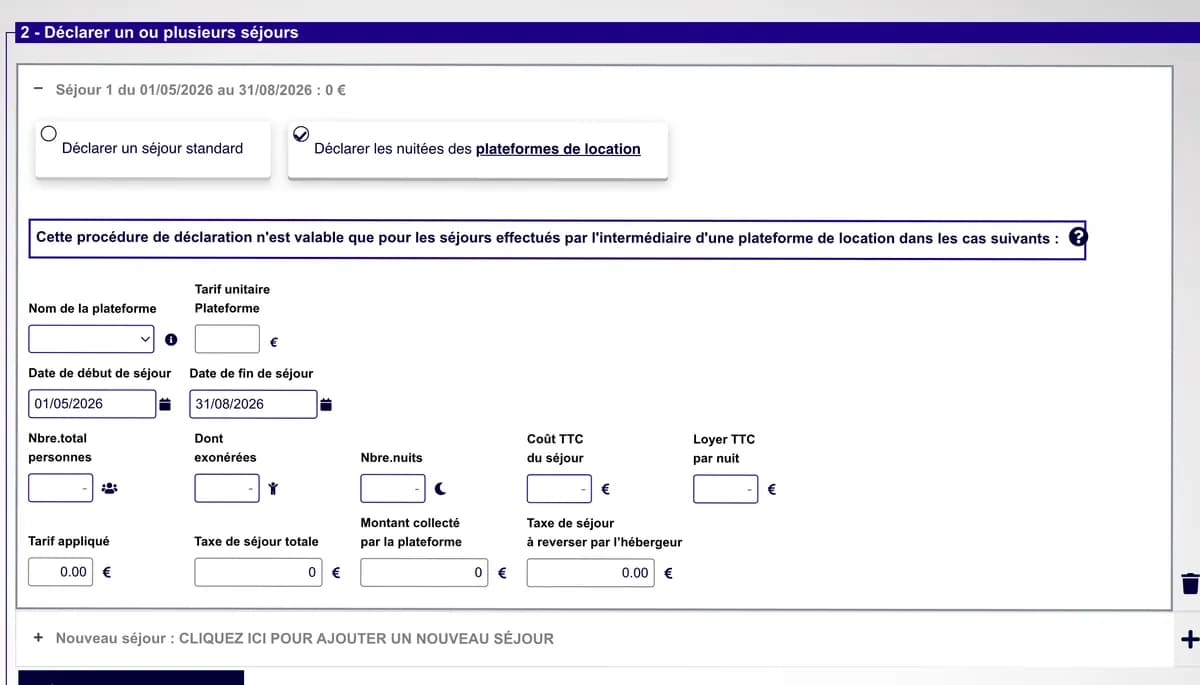
Step 2: platform stay form with platform, dates, guests, exempt guests and stay cost · portal screenshot, personal data hidden 5Add the next stays
Click « Nouveau séjour : CLIQUEZ ICI POUR AJOUTER UN NOUVEAU SÉJOUR » (New stay: click here to add a stay) and repeat for every booking in the period, one line per stay. When all stays are entered, click « Fin de saisie des séjours » (Done entering stays).
A stay spanning two periods (e.g. 28 August to 5 September) has nights in two four-month periods. The most accurate approach is to declare in each period the nights that fall in it, with the amount split pro rata.
6Attach the register, then save as draft or validate
« Registre des nuitées ou autre pièce jointe » (register of nights or other attachment): you can attach a summary of your stays (Excel, PDF). Useful if you are ever audited.
« Enregistrer la déclaration et la valider plus tard » (save and validate later) keeps an editable draft during the period. « Valider la déclaration » (validate the return) submits it for good. A return that is only saved does not count: remember to validate it before the deadline.
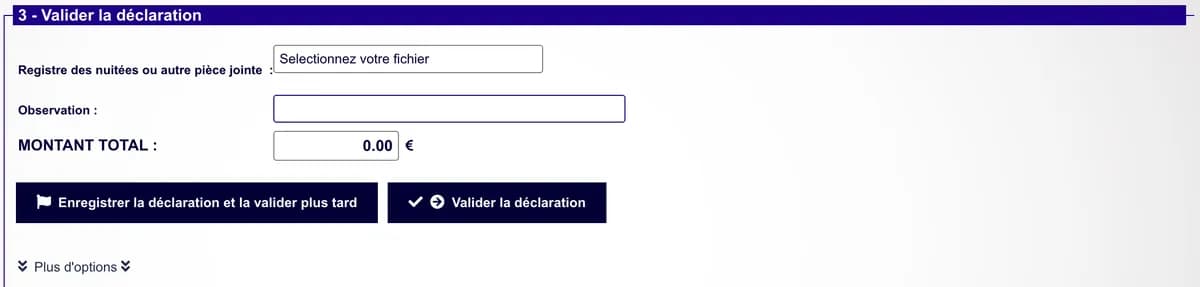
Step 3: attachment, comment, and save or validate buttons · portal screenshot, personal data hidden 7Check the confirmation
The portal shows « Déclaration effectuée avec succès » (return filed successfully) and the return appears under « Vos déclarations à 0 € ». You receive an e-mail from « Taxe de séjour - Métropole Nice Côte d'Azur » titled « Enregistrement de la déclaration N° … » (Registration of return no. …): keep it as proof. For a validated return, a receipt can be downloaded from the table.
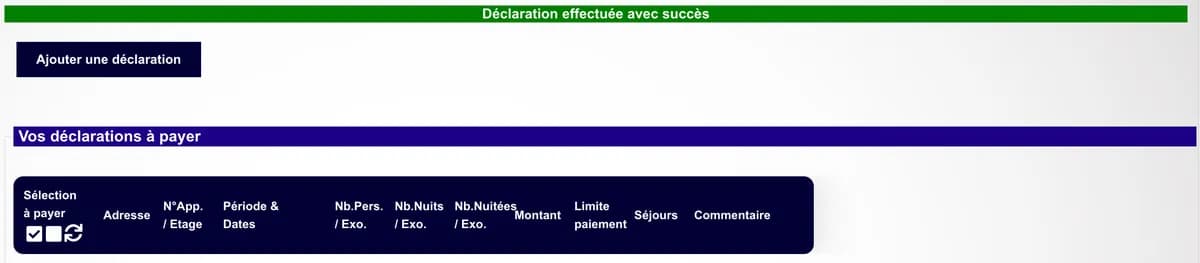
The « Déclaration effectuée avec succès » confirmation on the portal · portal screenshot, personal data hidden
The most common mistakes
- ✕Leaving the preselected period without checking it.
- ✕Entering the price the guest paid instead of the amount you received, after service and cleaning fees.
- ✕Swapping day and month in the dates: the night count becomes absurd.
- ✕Forgetting exempt minors or the exemption reason.
- ✕Choosing « séjour standard » for an Airbnb or Booking stay: the portal then asks the host to pay the tax.
- ✕Saving without ever validating: the return stays a draft.
- ✕Filing nothing for a period with no rentals: you must still declare « no stays ».
Frequently asked questions
Do I need to declare if Airbnb or Booking collected the tax?
Yes. The Métropole requires an online return for every rental, platforms included. The amount to pay is then €0.
Which amount goes in « Coût TTC du séjour »?
The amount the host received for the stay, after service and cleaning fees, per the Métropole's guidance for platforms.
What is the difference between saving and validating?
Saving keeps an editable draft; only a validated return counts.
Where can I get official help?
The Métropole's team answers by e-mail at taxedesejour@nicecotedazur.org, and by phone on Tuesday and Thursday mornings on +33 4 97 13 43 64.
Or let the Nuitées robot do it
Upload your Airbnb and Booking exports: Nuitées works out the stay cost, counts exempt minors, splits stays across periods, then fills in this form stay by stay and attaches the register. You validate. From €6 per return.
Try NuitéesIndependent guide, not affiliated with the Métropole Nice Côte d'Azur. Portal labels and rules may change: when in doubt, the portal's FAQ prevails. Tourist tax by town